
Guides
How to Fix “Error Writing Proxy Settings” in Windows 11


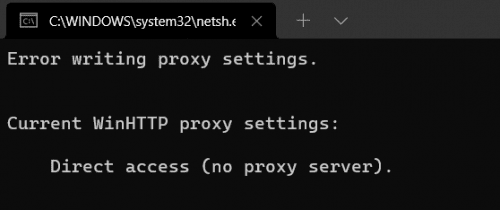
When you boot up your Windows 11 computer, Command Prompt may sometimes pop up on the screen with the following alert: “Error writing proxy settings. Access is denied“. A third-party app or program is probably trying to launch or access Command Prompt when logging into your user account. Let’s see how you can fix this unusual Windows 11 behavior.
Windows 11: Error Writing Proxy Settings
Naijatechnews | This image is copyrighted to the respective owner
Clean Boot Your Computer
Clean boot your computer and check if you’re still getting the mysterious “Error writing proxy settings” alert. Most likely, a third-party app or program is trying to access or edit your proxy settings when you log into your user account. If a background program is triggering these messages, you should no longer get them after performing a clean boot.
How to Clean Boot Your Machine
- Type msconfig in the Windows Search box.
- Double-click on System Configuration.
- Then, click on the Services tab.
- Tick the checkbox that says Hide all Microsoft services.
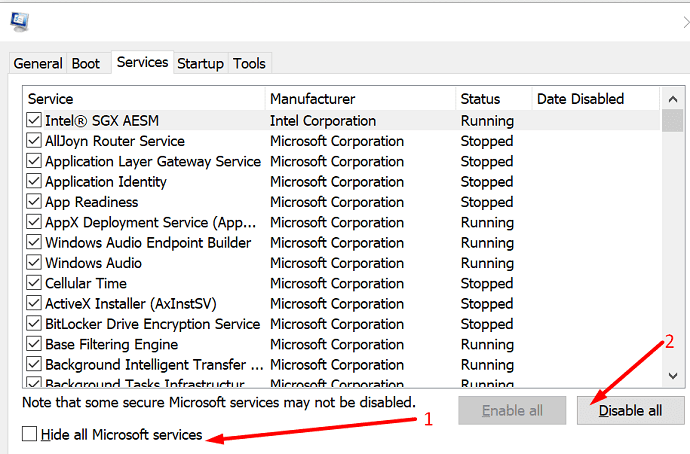
Naijatechnews | This image is copyrighted to the respective owner - Select Disable all.
- Click on the Startup tab, and open the Task Manager.
- Right-click on all the startup programs you want to disable.
- Save the new settings, and check the results.
Uninstall Unnecessary Apps and Programs
If the alert is gone, uninstall recently installed programs. Additionally, remove all the programs you no longer need or use.
- Launch Control Panel.
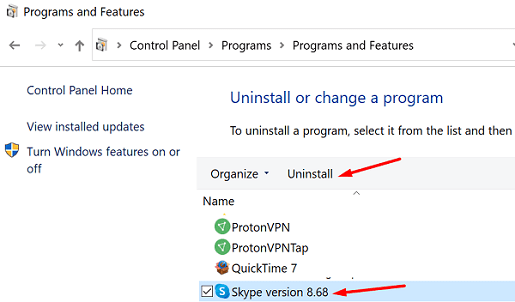
- Click on Uninstall a program.
- Select the program(s) you want to uninstall.
- Hit the Uninstall button.
Naijatechnews | This image is copyrighted to the respective owner
Change Your Terminal Settings
Some users noticed this alert started occurring after switching to Microsoft’s new Terminal. Change your Terminal settings, and check if the issue persists.
- Navigate to Settings.
- Click on Privacy & Security.
- Then, go to For developers.
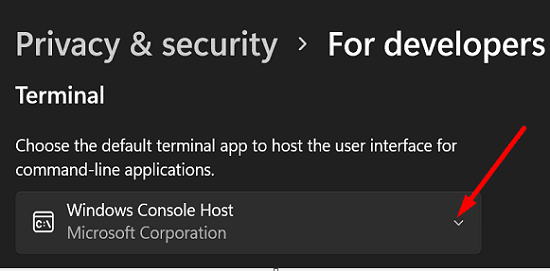
- Scroll down to Terminal.
- Use the drop-down menu to select a different Terminal version.
Naijatechnews | This image is copyrighted to the respective owner
Conclusion
To fix “Error writing proxy settings” on Windows 11, clean boot your computer. If this solution solves the problem, go to Control Panel and uninstall the apps and programs you no longer use. Navigate to Privacy & Security settings, and switch to a different Terminal version.
Did you manage to solve the problem? Which method worked for you? Comment down below.
READ NEXT
- How to Control What Apps Your Kids Download On Android
- RESOLVED: Your Organization’s Policies Are Preventing Us from Completing This Action
- How to Add/Change a Group Tone in WhatsApp
- RESOLVED: How to Fix Left Mouse Click Not Working in Windows 11
- How to Take Scrolling Screenshots on Chrome & Firefox for Free


