
News
How to Send an Email to All Your Gmail Contacts in One Click

Naijatechnews | This image is copyrighted to the respective owner
Just because you don’t work in an office-type environment doesn’t mean you don’t have to send many emails. You may have your own business and need to send your clients the new prices for your merchandise. In that case, you’re going to love how easy Gmail makes it for you to send the same email to various people.
Gmail: How to Send an Email to Various Contacts with One Click
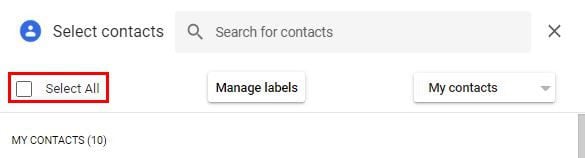
There are various ways you can add recipients to your emails. You can start typing the first few letters of the address, and their contact will appear. Click on the contact, and it’ll be added to the list. If you want to add everyone on your contact list, you have to click on the To and click on the box for the Select All option. Don’t forget to click on the blue insert option at the bottom right.
Naijatechnews | This image is copyrighted to the respective owner
If you see that you accidentally added someone, you can easily remove them by clicking on the X that’ll appear next to their name when you place the cursor on the contact. When you’ve chosen all the contacts, you make sure to double-check that an unwanted email address wasn’t added accidentally.
How to Add New Contacts to Your Gmail List
Sooner or later, you’re going to need to add a new contact to your list. You may also need to know how to edit the contact for whatever reason. The good news is that the process is easy and won’t require calling your techy friend to help you.
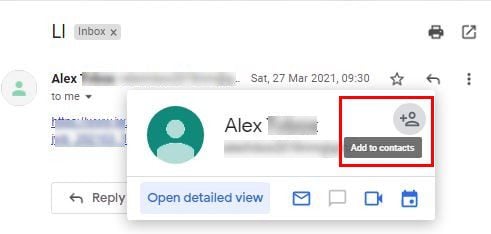
Find the email from the person you want to add to your contact list to get started. Place the cursor over the contact’s name, and a small window will appear with an icon with the shape of a person. If you place the cursor over the icon, it’ll say Add contact. Simply click on it, and the contact will be added. That’s all there is to it.
Naijatechnews | This image is copyrighted to the respective owner
Once the contact is added, the person icon will turn into a pencil icon. If you ever need to edit the contact, this is one way of accessing it. You can change things such as the name, company, job title, email address, phone number, and even add notes.
If you click on the show more option, you’ll find options such as:
- Address
- Birthday
- Website
- Relationship
- Custom field
Once you’re done with all of this, your new contact can be added to future emails.
Conclusion
As you can see, sending the same email to various contacts is not as difficult as you may have thought it was. You can send the email to all the contacts on your list with one click. Also, if you ever need to add someone to your list, you saw how you can do that with a simple click. Do you usually send a lot of emails? Share your thoughts in the comments below, and don’t forget to share the article with others on social media.
READ NEXT


