

Another way of getting account blocked nowadays are use my some scammers which they call there self Facebook hacking, they can get your Facebook account block by using different types of ways but the way they use most Is through a phishing site.
How To Unblock And Recover A Facebook Account
They can get your account hacked which might result in the account being blocked by Facebook for security purpose due to multiple login attempt, phishing simple means a site that is just design for you to input your Facebook details or other social media details (Username,Email, phone number and passwords) and result you not to get any result from the site after trying to give an attempt to login, The login details will be sent to the person that created the site after you trying log-in lol strange right? Let leave that for now.
In these articles we will lead you through the ways of not getting in hand by these kind of people and also reveal how they operate to you, cause ways which they get Facebook account block and hack these days is going high mostly in these our noble country Nigeria, which after they get the account hacked they make use of it for fraud using your details and some might change all your details, that is they will delete all your post and make the account for their own benefit just to scam all over the internet.
We will take it step by step because it seems there is a lot to be explained on these posts ranging from how to get your Facebook account unblock, how to prevent yourself not to fall in the hands of phishing site users, what phishing site looks like and what they are all about, and how you can prevent your account from multiple login attempt that might get your account blocked.
What Is A Phishing Site?
A phishing site is a proxy site that is mainly decorated to steal details from users, Common ones are designed to steal people’s social media details gain access to their accounts,s and change the account details to the one that might suit them just for the main users not to gain access to the account again Facebook account hacked or blocked.

In order not to fall victim of these (The phishing site) we will show you how to secure your account which if anyone try to change your details will have to go through some security steps either through your phone number or email before your account details can be change, these is called two-step verification process if you know about it before you can go straight to apply it to your Facebook account and if you don’t follow below steps to do that.
How To Set Two Step Verification Login For My Facebook Account Not To Get Blocked or Hack
- First log-in to your Facebook account
- Locate Setting & Privacy on your account menu
- Select Settings and Go to the Security option menu bar
- Click on the Security and login settings as shown on the screenshots below:
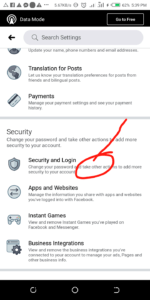
- Now select the option to use the two-authentication factor.
Related:Download Facebook Story Saver Apk
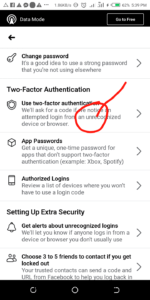
- Turn it on and selection option that you will like to use for your two-step authentication to be active.

- Either through your phone number or view Recovery code.
- The one mostly recommend is through phone number.
- Select it and complete your setting by adding your phone number and some other details they might ask of to complete the setting.
After following the process appropriately whenever you want to log in to your Facebook account or if someone what to log in to your account you will be ask to input your security code that was sent to the phone number you added in the setting when setting up your two-step authentication or two factor authentication.
With these you have successfully secure your account either from getting hacked or blocked by Facebook, Facebook account also can get blocked if they find out unusual activities on your account.
In the sense that they might ask you to Re-login your account and ask you some security questions, this is been apply to there policy I mean Facebook policy whenever they find user’s with unusual activities in there account.
Below are some questions they might ask you to answer whenever you fall victim.
How To Unblock Facebook Account For Unusual Activities
You will be asked to Re log in as said earlier and provide some questions as stated below :
Related:Facebook Video Downloader For Mobile And PC- How To Download
- Select five people request you just accept.
- Choose five or more then friends from your Facebook friend list.
- Last five post you commented on.
- Review your account for some post you might not be the one that create it.
- With some other questions.
- But the first thing they will ask you to do is to change your password to new password.
By following the process your Facebook account will be unblocked, Facebook added all this strong security just to prevent our account from falling into to hands of fraudsters and scammers so it is left for us to apply the security well likewise make use of it well.
Something I forget to say doing the phishing site writes up was that people that make use of that method to hack someone’s account have their normal ways of doing that which we will reveal below.
Methods In Which Fraudsters Or Scammers Make Use When Using Phishing Site to Hack or Block Facebook Account
- Your Friend Facebook account might gotten into hand already by them which you don’t notice, they will tell you to make use of the link, The phishing site link to vote for them which will result you to input your Facebook details thinking you want to vote but zero don’t fall for that again they will get your details.
Others ways are by telling you to come and invest through one of your friend Facebook account that might have also gotten in hand too by you trying to go for that they will send you the phishing site link to register and start investing too like them.
Note:
No investment site will ask you to provide your Facebook login details for them before you can make use of their platform.
Did you take advantage of our tips on How To Unblock Your Facebook Account? Don’t forget to leave your comment telling us what you think!


