
News
WhatsApp Web Gets Code Verify Extension on Google Chrome, Mozilla Firefox, Microsoft Edge

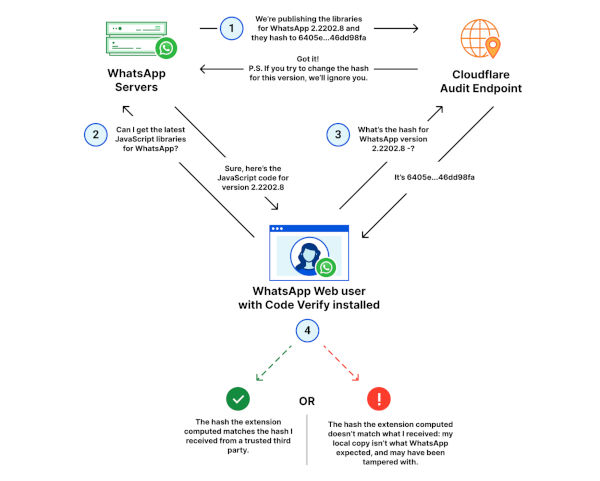
After installing the extension, it will automatically run when you start using WhatsApp Web. The extension doesn’t log metadata and user messages, and it doesn’t share any information with WhatsApp and Meta: it is also open-sourced, so everyone can verify what it does.
When you use WhatsApp Web, Code Verify can display different messages:
- Network Timed Out: an orange circle with a question mark will show up when your network has timed out.
- Possible Risk Detected: an orange circle with a question mark will show up when there is another extension that interferes with Code Verify.
- Validation Failure: the Code Verify icon will turn red and show an exclamation mark when the extension detects that you’re using a different and non-authentic code of WhatsApp Web.
- Validated: the Code Verify icon will turn green, so you’re using an authentic version of WhatsApp Web.
Download Code Verify
You can download Code Verify by visiting your web browser store, and it is available on Google Chrome, Mozilla Firefox, Microsoft Edge at the moment.
If you want more information about the extension, you can slide into the official post from Meta.
READ NEXT

Continue Reading


